Implementing QUIC from Scratch with Rust: Streams and Flow Control
Implement QUIC's core multiplexed stream transport and flow control, adjust the project structure, and add integration tests to keep the stack aligned with the QUIC specification.
QUIC Multiplexed Streams
Problems with a Single Data Stream
Head-of-Line Blocking
Everyone knows QUIC multiplexed streams are mainly designed to solve HOL blocking, so let's start there. I will not spend much time explaining Head-of-Line Blocking, because there are already many good explanations online.
From that wiki page, we can see that HOL blocking can happen at different protocol layers. QUIC solves the transport-layer version. A TCP connection provides a reliable byte stream, but one TCP connection only provides one reliable byte stream. When the application logically has multiple streams of data that do not depend on each other, that single reliable byte stream abstraction creates HOL blocking.
Lack of Priority Control
When the application has multiple data streams, they are often not only independent from each other, but also different in priority. Take remote desktop software as an example. User control commands, file downloads/uploads, desktop video, and audio all have very different priority requirements. We would rather protect important data than let file transfer consume all the precious bandwidth.
On TCP's single reliable byte stream, it is hard to control send priority. Once data enters TCP's send queue, the application has very little control and can only rely on TCP's own send strategy. TCP send behavior depends on many things: the peer's receive window, the sender's congestion window, the pacer, and even optimizations such as Nagle and corking.
TCP itself does not provide a useful priority API. It does have an urgent mechanism, but in practice it is not very useful. Support is limited, middlebox compatibility is a problem, and it can only carry a very small amount of urgent data. It might work for control commands, but it does not solve the general problem of multiple prioritized data streams.
TCP-Based Multiplexing
Normally I should now describe how QUIC implements multiplexed streams to solve HOL blocking and priority control. Before that, I want to look at how TCP, the old senior engineer in the room, usually deals with this problem.
TCP's answer is simple: if one TCP connection cannot provide multiple reliable byte streams, use multiple TCP connections. More concretely, the application maintains several TCP connections and assigns independent application streams to different TCP connections based on its own business logic.
By the way, there is another solution: MPTCP. It designs multiplexing directly into TCP and implements it in the kernel. But MPTCP is not mainly solving the two problems we just discussed. Its goal is to reuse multiple network paths, for example 5G, Wi-Fi, and Ethernet at the same time, so one reliable byte stream can run over several paths and achieve better transmission efficiency. QUIC Multipath follows a similar idea for QUIC. Maybe I can try implementing that draft in feather-quic later.
QUIC Stream Design Details Worth Noticing
Opening a QUIC Stream
Earlier posts discussed the QUIC handshake in detail and emphasized that transport-layer handshakes usually exist to establish security, connection uniqueness, and transmission efficiency. Now it is time for QUIC to show off again. QUIC decouples transport data (QUIC Stream Frame) from control messages, which means QUIC Stream itself does not need to worry about the handshake problems that ordinary transports have. A QUIC Stream can simply enjoy everything provided by the successfully completed QUIC handshake.
So a QUIC Stream does not need its own handshake. It can start sending data directly. The natural question is: how do we distinguish streams, and how is each QUIC Stream created? The answer is simple. A QUIC Stream Frame contains a Stream ID field that identifies the stream. When the application, whether client or server, wants to create a new QUIC Stream, it only needs to construct a new QUIC Stream Frame. The QUIC spec defines the last two bits of the Stream ID to indicate whether the stream was initiated by the client or server, and whether it is unidirectional or bidirectional. All key information is encoded in the Stream ID. The benefit is obvious: starting a QUIC Stream requires no extra procedure. The initiator sets the correct Stream ID and sends a QUIC Stream Frame with data.
One more detail: QUIC Stream Frame also carries offset and length. I mentioned offset in previous posts. It is the core field for reliable delivery within a single QUIC Stream. The receiver uses offsets to order the received data before handing it to the application. length is the data length of the QUIC Stream Frame. There is also a small optimization: QUIC Stream Frame has multiple frame type values (0x08..=0x0f) because the frame type itself encodes key bits, such as whether offset exists, whether length exists, and even the FIN flag that closes the stream. This saves bytes. QUIC efficiency is built from many small decisions like this. One pitfall I hit: if the length field is absent, QUIC treats the rest of the UDP datagram as data carried by that QUIC Stream Frame.
Closing a QUIC Stream
As mentioned above, opening a QUIC Stream only relies on the QUIC handshake result. Naturally, closing a QUIC Stream also does not need to care about QUIC Connection shutdown. A QUIC Stream only needs to handle how to end its own full-duplex communication correctly. A unidirectional stream reduces part of the work, but the essence is the same as a bidirectional stream.
Before describing QUIC Stream shutdown, I want to use TCP as the comparison again, because closing a data channel has many details. The most important question is whether data sent before the application calls the TCP close socket API can really reach the peer. A successful TCP send only means the data entered the TCP stack. The sender's only signal that the peer received data is the ACK from the peer. If packet loss happens, that confirmation can take longer. A successful TCP close does not guarantee that the last data actually reached the peer. This is the same underlying problem again: TCP couples the control channel and the data channel, so TCP close can mislead users.
There is also a small edge case. If the TCP receive queue still has unread data when the application calls close, the TCP stack does not perform the normal four-way close. It sends an RST to terminate the connection directly. That may prevent the peer from receiving the sender's final data before close. The original intent is to tell the peer that this side did not process received data, but it feels clumsy and easy to misunderstand. Since RST makes the peer's TCP stack terminate directly, the peer may fail to process data it should have received.
This is where TCP's Linger option comes to mind. It is basically a patch for this problem. On one hand, Linger can make TCP close block until the final data is acknowledged by the peer before performing the four-way close. On the other hand, Linger can choose to terminate the connection with RST directly, though that clearly affects the data channel and is not a great default. QUIC Stream is only about data transfer, so when a QUIC Stream closes, it does not need to decide whether the whole QUIC Connection should end. It only needs to close itself at its own pace.
But there is a second issue: TCP is full duplex. When the application closes a TCP connection, it effectively closes both the read and write sides. TCP shutdown exists to solve that by allowing either direction to be closed separately.
QUIC Stream naturally supports separate read and write shutdowns too. The normal way to close the write direction is to set the FIN flag in a QUIC Stream Frame. The way to close the read direction is to send a Stop Sending Frame. One detail worth noting is the role of Reset Frame. My understanding is:
- The
FIN flagin aQUIC Stream Framemeans normal active close of the write direction; the sender will still ensure all already-sent data reaches the peer.Reset Frameimmediately closes the write direction and tells the peer that the sender will no longer take responsibility for in-flight data. It is usually used when the sender's application logic decides no more data is needed. - If the sender receives a
Stop Sending Framefrom the peer, it means the peer no longer wants future data from the sender. The sender should then immediately respond with aReset Frame, so data sending can stop quickly and reduce overhead.
The stream state machine diagram in the RFC does not show Stop Sending Frame, which confused me at first. But after reading the RFC text and related implementations, the overall design became clear.
Comparing TCP Multi-Connection and QUIC Multiplexing
Earlier I mentioned the multiple-TCP-connections approach. It tries to solve similar problems as QUIC multiplexed streams, but the two designs are still very different.
- From a protocol design perspective, QUIC multiplexed streams have a big advantage. Multiple QUIC streams share the same QUIC handshake and connection close machinery, while multiple TCP connections repeat that process for every connection. If TLS is involved, the cost is even worse. For congestion control, QUIC streams also have an advantage because they share one congestion control mechanism and probe information efficiently. Multiple TCP connections have to run independent congestion control loops.
- From an engineering perspective, multiple TCP connections are also more complex. They are several independent connections, so the application has to answer the classic distributed-systems questions: who am I, where am I, and where am I going? The application needs extra coordination protocols to make those TCP connections work together.
- Both approaches try to solve priority control, but QUIC's design is clearly better. QUIC streams truly share the same congestion control mechanism. When consuming new congestion window capacity, the stack can send data according to preconfigured stream priorities. With multiple TCP connections, the application has to intervene and control how quickly low-priority data is written into its TCP connections, because TCP does not provide an application API for controlling the lower-layer send strategy.
- Multiple TCP connections do have one advantage: they can naturally use multiple network paths. Since there are already multiple TCP connections, putting them on different paths is not hard.
QUIC Flow Control
QUIC flow control is more complex than TCP flow control because QUIC has multiple streams. At the same time, QUIC learned from TCP's earlier design problems and improved several details.
The most obvious issue with TCP flow control is efficiency. Every TCP packet has to carry the receive window size, even when the peer is nowhere close to hitting the window. Also, the poor 2-byte window field in the TCP header is not enough for large receive windows. TCP extensions can solve this, but it is still a risk because incompatible stacks or middleboxes can break it and hurt efficiency. QUIC decouples control messages and data messages, representing both as independent QUIC frames. For example, QUIC Max Data Frame carries the receive window size for the whole QUIC connection. QUIC does not have the TCP problems above.
Because QUIC does not constantly carry the receive window, it has to solve two questions: when to send receive window updates, and what the sender should do when it runs out of receive window. The first question is handled by the QUIC RFC, which recommends updating the receive window early enough based on the network state and the application's consume rate, balancing efficiency and overhead. The well-known silly window syndrome reminds us that receive window update strategy matters. If the receive window grows very slowly, do not send tiny updates too often; accumulate for a while first. The second question is solved by QUIC Blocked Frame. The sender actively sends this frame to tell the peer, "I am blocked and need you to update the receive window," instead of hoping the receiver will notice. TCP's Zero Window Probe feels more like a patch; QUIC's targeted design is clearer.
Finally, the main point: how does QUIC implement flow control for multiple streams? It is actually straightforward. QUIC extends Max Data Frame and Blocked Frame so they support both QUIC Connection and QUIC Stream scopes. That way, the connection and each stream can have their own flow control. During the initial handshake, QUIC also carries Transport Parameter information through a TLS 1.3 extension, so all flow control settings are negotiated ahead of time.
Implementation Details
Receive Buffer Design
The current implementation is not my favorite, and some extreme cases may still have bugs (I already marked them in comments). But since I plan to rewrite this using Rust's async ecosystem later, this is only a temporary simple solution. The receive buffer is essentially a sliding-window algorithm problem. The application keeps calling QUIC stream recv to consume data from the receive buffer and move the left boundary. Incoming QUIC Stream frames keep filling data into the receive buffer and move the right boundary.
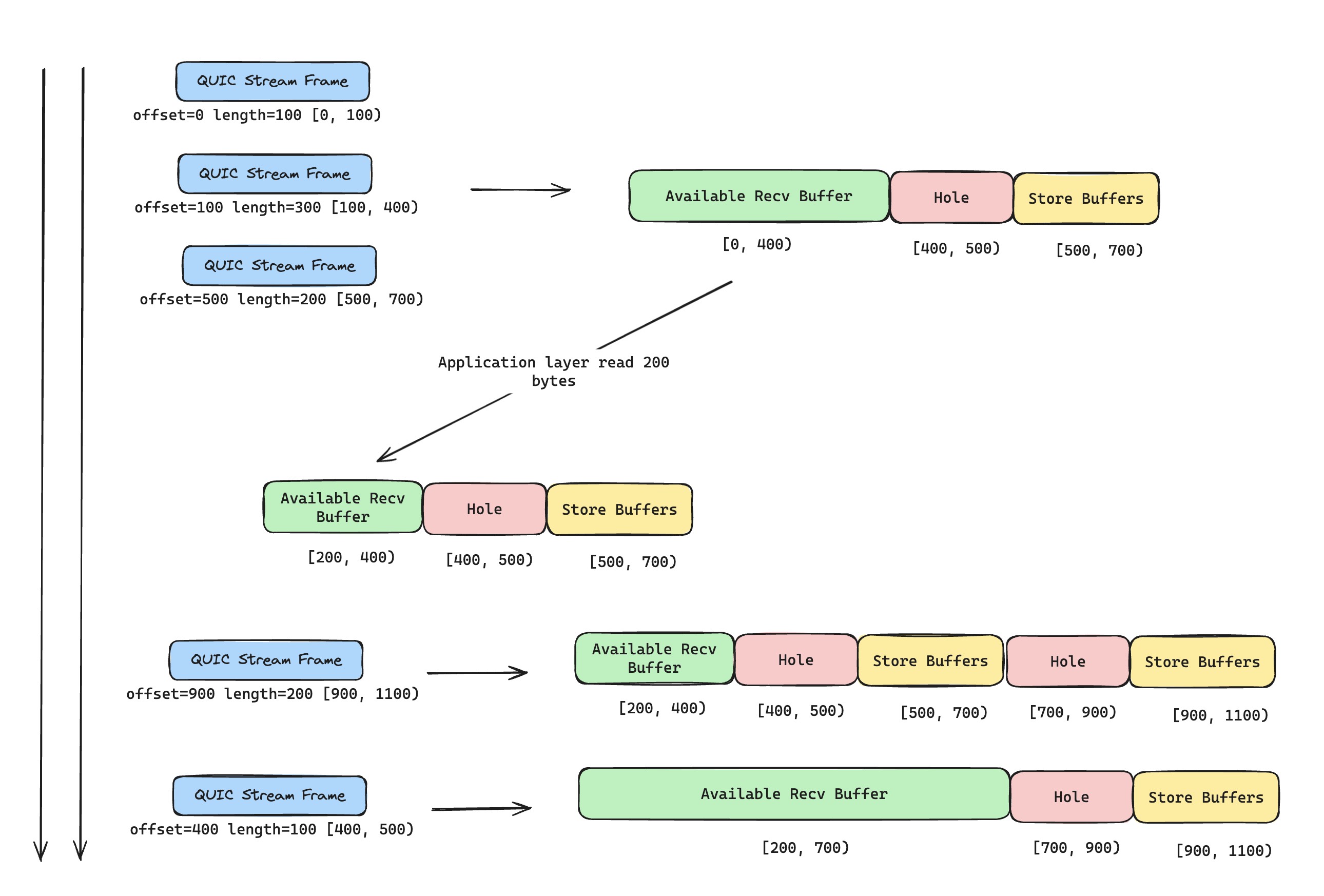
Stream frames can arrive out of order, so we must use stream offset strictly to update the right boundary correctly. We also need to cache out-of-order data efficiently, so once the hole is filled, we can merge data and hand it to the upper layer in order. I personally prefer trading memory for time: allocate enough buffer space based on the largest received offset (flow control prevents this from wasting too much memory), leave holes empty, and fill them when data arrives. That wastes some memory but is more efficient. For now, I use a simpler approach: cache discontinuous data with its offset, and when new stream frames arrive, move the right side of the sliding window if the data becomes continuous.
QUIC Stream Implementation Notes
Stream Priority
Earlier I mentioned QUIC multiplexing's advantage in priority control. But when actually implementing QUIC stream priority, there are many details to watch. We can simplify the problem first: if streams have no priorities, and QUIC is allowed to send data, for example because it gets new congestion window capacity, how should it consume each QUIC Stream's send queue?
The first answer that comes to mind is Round Robin: distribute send window fairly across all streams that can send data. One detail matters here: a single UDP datagram should preferably carry QUIC Stream Frames from the same stream. That can reduce the degree of HOL Blocking. Since QUIC already separates streams by design, we should not tie them back together when sending data. When the amount of pending data is small, we do not need to be too strict; fully using each UDP datagram for efficiency is also important.
If streams need priorities, the QUIC RFC suggests that QUIC libraries should provide user APIs for priority adjustment. The simplest API is letting users set a QUIC Stream priority, similar to setting a process nice value on Linux.
Once the application sets priorities, the pressure moves to the QUIC stack: how should it schedule send window across streams with different priorities? This looks a bit like OS scheduling: efficiency and fairness. We want high-priority streams to get enough send window, but we do not want to starve low-priority streams too badly. Since I have not implemented congestion control yet, my current send queue consumption only uses a simple Round Robin strategy 😁.
Flow Control Details
The part that made me most dizzy was the amount of flow control configuration negotiated when the QUIC connection is established. Besides receive window sizes, there are limits on the number of unidirectional and bidirectional streams, and so on. Whenever I handle these settings, I keep one rule in mind: the receiver declares its own limits. So as a sender, the limits I care about must come from the peer. Once that rule is clear, configuration handling becomes much less messy, and it is easier to make send-side limit checks and receive-side validation correct. Is it really correct? I still need more tests later.
Integration Test Design
As I said before, feather-quic badly needs automated tests. Writing a protocol stack is painful. The RFC gives guidance, but there are too many details. Without enough tests, it is hard to trust the project quality.
First, I adjusted the project structure. I split the QUIC stack implementation into its own crate (feather-quic-core), added another crate (feather-quic-tools) for client tools built on top of the stack, and added a separate automated testing crate (feather-quic-integration-tests). The project now looks much cleaner and finally feels a little more like a proper project.
Then came the automated tests. Since I have not implemented the server side in my stack, and since I should not let two weak implementations validate each other, I use quinn to quickly build a QUIC server. The feather-quic client talks to that server for echo-like tests and large data transfer tests. I also added simulated packet loss and reordering to make sure the features I implemented earlier are usable as a whole. As expected, these tests found a lot of silly bugs 😂. The good news is that once this test suite exists and keeps growing, the project at least has a quality floor.
Epilogue
Implementing these features did not have too many dramatic moments. They were fairly straightforward. The only thing worth mentioning is that I used a lot of AI tools while restructuring the project and writing integration tests.
I want to praise Cursor here. It is smart and pleasant to use, especially in how it understands project context and inserts generated code while showing diffs. In this experience, it easily beats Copilot. I do not understand why Copilot lags so far behind on core interaction details. With a good example already in front of it, copying should not be that hard. Is it big-company disease, or is the company-provided Copilot version I use missing features? Another thing I want to complain about: Copilot's Vim support is not good enough. Even Copilot Chat, a core feature, does not work properly there, which makes me suspect Microsoft has some business considerations behind it. Luckily, the Vim community is active, and AI-related plugins are everywhere.
I also want to briefly talk about AI programming. It has been a hot topic for the last year or two, for a simple reason: AI programming really can improve programmer productivity. But that improvement has diminishing returns. Once a project becomes complex, generated code needs stricter review and testing to avoid introducing more problems, so the speedup is not as dramatic as people first imagined.
To me, AI programming works best when the task is clear. If you already know the implementation details and mainly want AI to save your time, it can help a lot. Refactoring is a simple example. Many people avoid it because it takes time. With AI, that time can be saved. Cursor handled most of this project structure adjustment after I described my idea. So when I pair with AI, I often focus on two things: figuring out how the feature and architecture should work, and debugging why the generated code does not behave as expected.
As usual, here is the related PR. For the next QUIC post, I plan to finish QUIC connection close. After that, the basic features of the feather-quic protocol stack should be almost complete ✿✿ヽ(°▽°)ノ✿.